

WooCommerce checkout abandonment costs small UK shops more sales than almost anything else on the site. The Baymard Institute has aggregated 50 separate studies on cart abandonment. The average documented rate is 70.22%. Seven in ten people who put something in a basket do not buy it.
Some of that is unavoidable. Baymard found 42% of shoppers abandoned simply because they were browsing and not ready to buy, which no amount of checkout work will recover. The rest is yours to lose, and the reasons people give are consistent enough to work through as a checklist. Here's that checklist, with the WooCommerce settings and habits that fix each one.
On this page
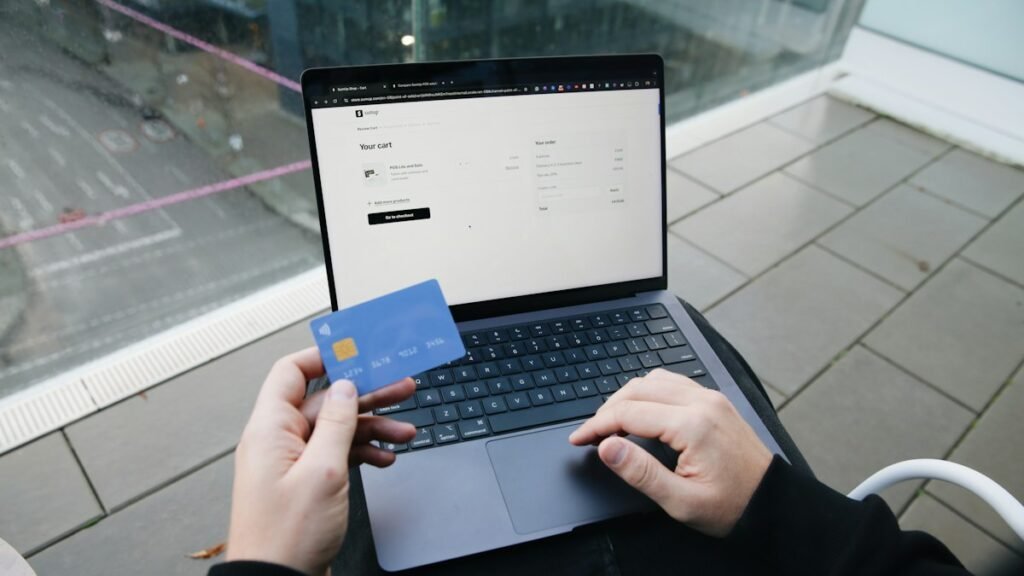
- The documented reasons for WooCommerce checkout abandonment, in order
- Surprise costs, the single largest cause
- Delivery speed, and being honest about it
- Trust, which is mostly small visual things
- Forced account creation, the easiest fix on the list
- Checkout length, and the fields you do not need
- Errors and crashes, which are usually speed
- Payment methods UK shoppers expect to see
- Mobile is where the checkout really gets tested
- Block checkout or classic checkout
- Abandoned cart emails, used carefully
- A 30 minute WooCommerce checkout abandonment audit
- Tactics that make abandonment worse
- WooCommerce checkout abandonment at Christmas and Black Friday
- Where to start
- Trade and B2B stores have their own version of this
- How to measure WooCommerce checkout abandonment properly
- Related reading
- Want your checkout looked at?
The documented reasons for WooCommerce checkout abandonment, in order
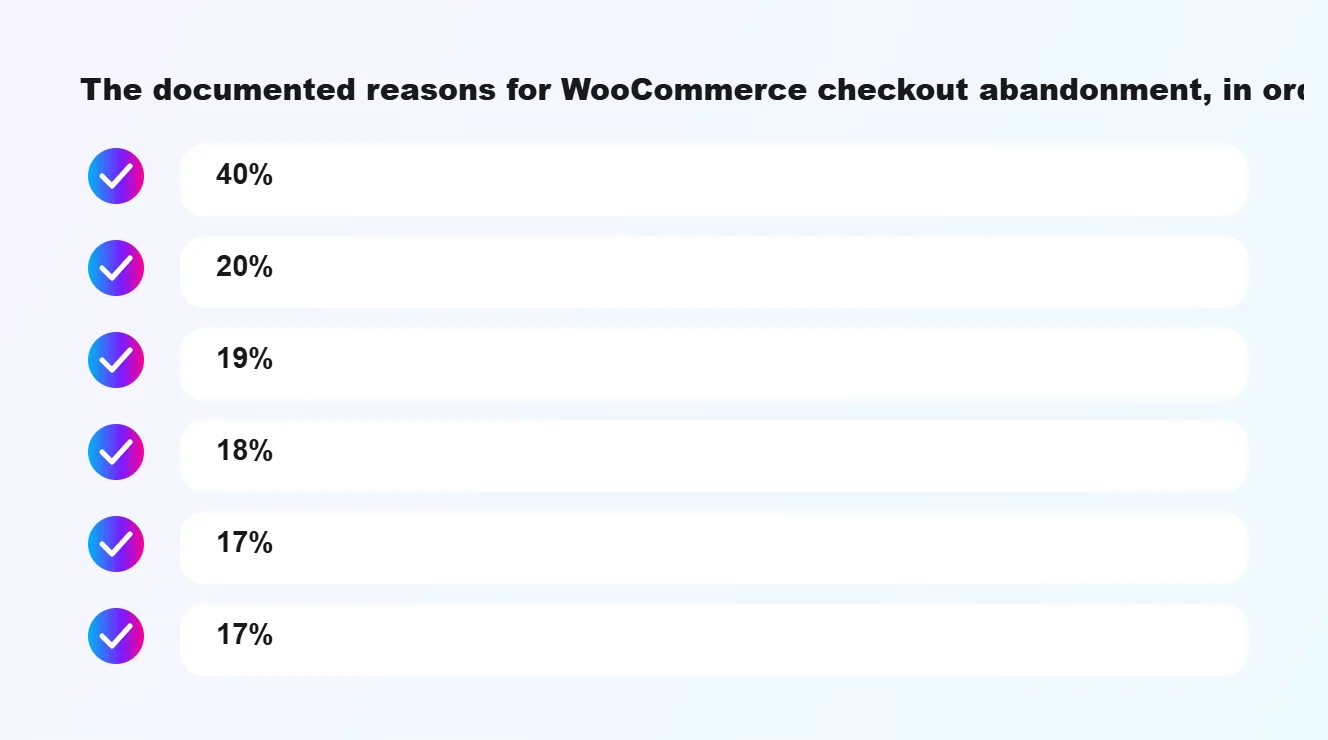
Excluding the browsers, this is what shoppers say made them leave:
Note what is not on that list. Nobody abandoned because the product photography was insufficiently aspirational or the brand story was thin. WooCommerce checkout abandonment is a plumbing problem. The causes are practical, and four of the six are things you can change in WooCommerce this week. That's the good news: most of it is self-inflicted, so most of it is fixable.
- 40% extra costs were too high (shipping, tax, fees)
- 20% delivery was too slow
- 19% did not trust the site with card details
- 18% the site required creating an account
- 17% the checkout was too long or complicated
- 17% the website had errors or crashed
Surprise costs, the single largest cause
Forty per cent. Nothing else comes close.
The problem is almost never that the shipping is expensive. It is that the shopper did not know about it until step three of the checkout, having already mentally committed to a different total. That feels like being caught out, and people leave irritated rather than merely undecided.
In WooCommerce, enable the shipping calculator on the basket page rather than leaving delivery costs to the checkout. Better still, state delivery cost on the product page itself. If you can afford a free delivery threshold, show progress towards it in the basket, because "spend £12 more for free delivery" tends to lift order value rather than cost you margin.
UK specific: show prices inclusive of VAT to consumers throughout. A price that grows by 20% at the final step is the most damaging version of this problem, and for B2C it is also the wrong way round under UK pricing rules.
Delivery speed, and being honest about it
A fifth of cart abandonment comes down to delivery being too slow. UK shoppers have been trained by the large retailers to expect next day as an option, even when they do not choose it.
You do not need to match that. You need to be specific rather than vague. "Delivered by Thursday 12 September if you order in the next 6 hours" outperforms "2 to 4 working days" even when it describes the same thing, because it removes the guessing. Offering a paid faster option also helps the people who need it, and the ones who do not will feel better about choosing standard.
Be clear about the carrier too, because an unfamiliar or disliked courier is a quiet cause of WooCommerce checkout abandonment. Royal Mail, DPD and Evri carry very different reputations, and shoppers who have had a bad run with one of them want to know before they order, not after.
Trust, which is mostly small visual things
Nineteen per cent did not trust the site with their card details, which makes trust the third biggest reason people leave. That judgement is made in seconds and on surface signals.
What helps: a working padlock and no mixed content warnings, recognisable payment logos rendered properly rather than as a blurry image, a real returns policy that a person can find without hunting, a UK phone number or address in the footer, and reviews on the product itself.
Adding Klarna or Clearpay does more than offer instalments. For a lot of shoppers the presence of a name they recognise is itself the reassurance, because it implies somebody else has vetted you.
State your returns terms plainly. Under the Consumer Contracts Regulations most UK online purchases carry a 14 day cancellation right, so you are offering it whether you advertise it or not. Advertising it converts better than staying quiet about it.
Forced account creation, the easiest fix on the list
Eighteen per cent leave because you made them register. It's the cheapest fix for WooCommerce checkout abandonment you'll ever make. In WooCommerce this is one checkbox: WooCommerce, Settings, Accounts and Privacy, allow customers to place orders without an account.
You can still offer an account after the order is placed, at which point the customer has a reason to want one. Requiring it beforehand asks for commitment before you have earned any.
Checkout length, and the fields you do not need
The default WooCommerce checkout asks for company name and a second address line for every order. Most stores need neither. Every field is a small tax on completion, paid by every customer.
Add a UK postcode lookup so people type six characters instead of four lines. Turn off the separate billing address unless you need it. Keep the whole thing on one page if your product range allows it, because every extra step feeds WooCommerce checkout abandonment.
Errors and crashes, which are usually speed
Seventeen per cent hit something broken. Speed is the least visible cause of WooCommerce checkout abandonment, because the owner rarely checks out on a phone. In WooCommerce this is rarely a dramatic failure. It is a checkout that takes eleven seconds to update after a postcode is entered, on a store running thirty plugins on shared hosting, where the shopper concludes it has hung and closes the tab.
Cart and checkout pages cannot be page cached, so they expose your real server performance in a way the rest of the site does not. Test yours on a phone on mobile data, add something to the basket, and time it. Then audit the plugins, because on most stores we look at, two or three are responsible for the majority of the load.
Payment methods UK shoppers expect to see
A checkout that only takes card details typed in by hand feels dated to a lot of shoppers now. On a phone, typing sixteen digits, an expiry date and a CVC with your thumb is exactly the moment people give up.
Wallets first on mobile
Apple Pay and Google Pay let a shopper pay with a fingerprint or a glance, and they fill in the delivery address too. Both are available through the main WooCommerce payment plugins, including WooPayments and the Stripe extension. If most of your traffic is mobile, and for most small shops it is, wallets are one of the quickest cuts to WooCommerce checkout abandonment you can make.
PayPal still matters
Plenty of UK shoppers, especially older ones, would rather not hand their card to a shop they've never heard of. PayPal solves that for them. It doesn't need to be the main option, but leaving it off costs you a slice of buyers who won't say why they left.
Don't offer eight options either
Every extra logo and radio button is one more decision. Card, wallets, PayPal and one instalment option covers almost everyone. Anything beyond that should earn its place with real orders.
Mobile is where the checkout really gets tested
Most small shops we look at get more than half their traffic from phones, and the checkout was designed on a laptop. Open yours on a mid-range Android phone over 4G and try to buy something with one hand. You'll find the problems in about two minutes.
None of that needs a redesign. Fixing mobile WooCommerce checkout abandonment is mostly theme settings, a bit of CSS and removing plugins that fight each other.
- Fields should bring up the right keyboard: numbers for phone, email layout for email.
- Browser autofill should work. If your theme or a plugin renames fields oddly, autofill breaks and people type everything.
- Buttons need to be big enough to hit with a thumb, with space between them.
- Error messages should appear next to the field that's wrong, not in a red box at the top of the page.
- The order total and delivery cost should be visible without scrolling back up.
Block checkout or classic checkout
WooCommerce now ships the block-based Checkout by default on new stores, and older stores are still on the classic shortcode version. The block checkout is cleaner and quicker out of the box, and the WooCommerce team is putting its effort there.
The catch is plugin compatibility. Some older payment, delivery-date and custom-field plugins only work with the classic version. Before you switch, list every plugin that touches the checkout and check each one against the block checkout on a staging copy. Switching on a live store on a Friday afternoon is a good way to lose orders rather than win them back. The official WooCommerce documentation covers both versions and is the place to check what each setting does.
Abandoned cart emails, used carefully
Once someone has typed their email address into the checkout and left, you can send a reminder. Done well, it recovers a share of the orders lost to WooCommerce checkout abandonment caused by a phone call or a flat battery rather than a decision. Most WooCommerce email tools and a few dedicated plugins will do this.
Keep it to one or two emails. The first within a few hours, with the basket contents and a single link back. A second a day later, only if you've got something useful to add, like a delivery date or an answer to a common question.
Be careful with the rules. Under UK GDPR and PECR, marketing emails generally need consent, and whether a cart reminder counts as marketing depends on how you set it up. Get a view on it before switching reminders on, particularly if you plan to add discount codes to them.
Don't train customers to abandon on purpose. If every reminder carries 10% off, regular buyers soon learn to leave the basket and wait. Save discounts for the second email, or leave them out entirely.
A 30 minute WooCommerce checkout abandonment audit
Do this yourself before paying anyone. Use a phone, a private browser window and a real product, and go through it as a first-time customer would.
Every "no" or "too slow" on that list is a small, fixable cause of WooCommerce checkout abandonment. Write them down in order of how many customers each one touches and work from the top.
- Can you see the delivery cost before you reach the checkout page?
- Are you allowed to check out as a guest?
- How many fields are you asked to fill? Could any of them go?
- Does postcode lookup or autofill work?
- Can you pay with Apple Pay or Google Pay?
- How long does the page take to respond after you enter a postcode or change delivery?
- Is there a returns policy and a UK contact number within one tap?
- After payment, does the confirmation page say clearly what happens next and when?
Tactics that make abandonment worse
Some popular tactics make WooCommerce checkout abandonment worse, or cause trouble of their own.
If you've got any of these running, turn them off for a month and compare the numbers. Most shops find the tactic was costing more than it earned, and their WooCommerce checkout abandonment drops a little once it's gone.
- Fake countdown timers and "only 2 left" messages that aren't true. Shoppers see through them, and misleading urgency can fall foul of UK consumer protection law.
- Exit pop-ups that cover the checkout on mobile. You're blocking someone who was about to pay.
- Pre-ticked boxes for newsletters or add-ons. They're irritating and, for marketing consent, not valid anyway.
- Upsells inserted between the basket and payment. Offer them on the thank-you page instead, when the sale's already safe.
- Redirecting to a third-party payment page that looks nothing like your site, with no warning.
WooCommerce checkout abandonment at Christmas and Black Friday
Busy weeks expose every weak spot at once. Black Friday, the run up to Christmas, a mention in a Sunday paper. Traffic jumps, shared hosting struggles, and WooCommerce checkout abandonment climbs exactly when the orders matter most.
Most of it comes back to speed. A checkout that updates quickly on a quiet Tuesday can crawl when hundreds of people hit it together. Load test before the rush, because WooCommerce checkout abandonment caused by a slow server is the easiest kind to prevent and the hardest to fix mid sale. Ask your host what happens when traffic triples, and get the answer in writing.
Delivery cut off dates matter too. A gift shop in Brighton should show the last order date for Christmas delivery on every product page and again in the basket. Shoppers who aren't sure it'll arrive in time don't gamble. That doubt is a seasonal form of WooCommerce checkout abandonment, and a clear date fixes it.
Then watch failed orders through the peak. A gateway hiccup at 8pm on a Sunday in December can quietly add to WooCommerce checkout abandonment for hours before anyone notices. Check the orders list twice a day in busy weeks. It's dull, and it pays.
Where to start
Take the two largest causes of WooCommerce checkout abandonment first. Show total delivery cost before the checkout, and turn off forced registration. Between them they address well over half of the stated reasons people give, and neither needs a developer.
Then measure. Your store will not report its WooCommerce checkout abandonment rate on its own, so set up funnel tracking before you change anything else, or you will be guessing about whether the next change helped.
Trade and B2B stores have their own version of this
If you sell to trade customers, say a supplier of catering equipment in Birmingham or a fixings wholesaler in Glasgow, abandonment looks different. Trade buyers aren't browsing. They leave because the checkout doesn't fit how they buy.
Get those right and WooCommerce checkout abandonment among trade customers tends to drop without any design changes at all. Get them wrong and they'll just phone the order in, which costs you staff time instead.
- They want to pay on account, not by card. Offer invoice payment to approved customers.
- They need prices excluding VAT, with VAT shown clearly as a separate line.
- They want to reorder last month's list in two clicks, not search for thirty items again.
- They need a purchase order number field, and it has to appear on the invoice.
How to measure WooCommerce checkout abandonment properly
You need two numbers: how many sessions start the checkout, and how many finish it. Everything else is detail.
Set up the funnel in GA4
Google Analytics 4 has standard ecommerce events for adding to cart, beginning checkout and purchase. Most WooCommerce analytics plugins send them for you. Build a funnel exploration with those three steps and you'll see where people drop out, split by device, which tells you where your WooCommerce checkout abandonment really happens. If mobile drops twice as hard as desktop, you know where to look.
Check the orders WooCommerce already records
In WooCommerce, the orders list shows "Pending payment" and "Failed" orders. A pile of failed orders usually points at the payment gateway, not the shopper. Look at the notes on a few of them. Card declines, 3D Secure timeouts and gateway errors each tell a different story.
Change one thing at a time
If you switch on guest checkout, add Apple Pay and cut four fields in the same week, you won't know which one worked. Make one change, give it two to four weeks depending on your order volume, then make the next. Slow, but it means your decisions about WooCommerce checkout abandonment are based on your own shoppers rather than someone else's study.


Related reading
- The trust and friction points above are a design problem as much as a technical one: the psychology behind conversion-centric UI and UX.
- If your store takes enquiries as well as orders, the same failures appear on the contact form: five things we check when a site has traffic but no enquiries.
- Selling in Pakistan rather than the UK changes which payment methods matter and why cash on delivery persists: what the 92% digital payments figure means for a small shop.
Want your checkout looked at?
If WooCommerce checkout abandonment is eating your sales, send us your store URL and we will go through the checkout as a customer would, on a phone, and send back what we found and what we would change first. Free, and written in plain English rather than as a plugin shopping list.
Book a free consultation at devsioservices.com/contact, or read about our WooCommerce and Shopify store builds and our WooCommerce speed optimisation work. Fixed-price options are on the pricing page.
Frequently asked questions
Why do shoppers abandon WooCommerce checkouts?
The usual reasons are unexpected costs such as delivery shown late, being forced to create an account, a long or confusing form, missing payment options, and a slow or unstable checkout page on mobile.
Does guest checkout reduce abandonment?
For most small stores, yes. Let people buy without an account and offer to create one after the order is placed, when they have a reason to say yes.
Which payment methods should a UK WooCommerce store offer?
Cards plus the wallets your customers already use, typically Apple Pay and Google Pay, and PayPal. Adding a buy-now-pay-later option can help for higher-value baskets.
Related guides
- Is your page builder slowing down your WordPress site? The fixes that work without a rebuild.
- European Accessibility Act: does it apply to your website? A practical checklist.
