
AI Automation for Small Businesses in the UK and Europe
Most small business owners lose hours every week to enquiry replies, booking confirmations, invoice chasing and copying data between apps. We automate those tasks with n8n, Make and AI agents so the work happens in the background and your team handles the exceptions.
Take the Repetitive Admin Off Your Team's Plate
AI automation for small businesses is mostly about the dull jobs. Replying to the same enquiry for the fortieth time, confirming tomorrow’s appointments, chasing an invoice that is three weeks late. Nobody started a business to do this, yet in most small firms we speak to it eats a full day of someone’s week.
On this page
What AI automation for small businesses looks like day to day
Forget robots and dashboards full of charts. In practice, AI automation for small businesses means fewer tabs open and fewer things to remember. A good automation is a small piece of work that happens on its own, in the apps you already pay for, and tells a person when it gets stuck.
A new enquiry lands on your website. A minute later the customer has had a proper reply, the lead is sitting in your CRM and someone on the team has a two-line summary in Slack.
No one touched a keyboard. That is the whole idea.
A few examples from real business types
- A dental practice in Bristol sends booking confirmations, reminders the day before and a review request after each visit, all from the diary it already uses.
- A letting agent in Manchester has an assistant that answers routine tenant questions from its own policy documents and passes repairs to the right person.
- An accountancy firm in Dublin collects client documents, reads the key figures from receipts and files them into the right folder in Google Drive.
- An online shop in Rotterdam sends WooCommerce orders to Xero and flags any payment in Stripe that does not match an order.
None of these replace a member of staff. They take the copying, pasting and reminding off their desk.
Signs you are ready for it
AI automation for small businesses works best when a task already happens the same way most of the time. If three people each handle enquiries differently, we agree one way first, then automate it.
It also helps if you’re already on Google Workspace, Microsoft 365, Xero or a booking app with an API, and if one person on the team is willing to keep an eye on the workflows after we hand over. Nobody has to become “the IT person”.
6 easy jobs to automate first
We rank tasks by the hours they cost and how often they follow the same steps. These six come near the top for nearly every business we map.
- Enquiry replies. A first response in minutes, written from your own FAQs and price list, with anything unusual handed to a person.
- Booking confirmations and reminders. Fewer no-shows and fewer “what time was it again?” calls.
- Invoice chasing. Xero or QuickBooks pings a polite reminder at 7, 14 and 30 days. Once the money’s in, it shuts up.
- Form data into your CRM. Website, Facebook and phone enquiries in one place, not three.
- Quote follow-ups. A nudge two days after a quote goes out, so good leads do not go quiet.
- Review requests. A message after a finished job asking for a Google review, sent only to happy customers.
Start with one or two. Once they run quietly for a month, add the next.
Each of these is a small piece of business process automation with AI added only where the wording changes from customer to customer. This is how AI automation for small businesses stays manageable and does not turn into a second job.
Business process automation or AI: which one you need
Not every task needs AI. A lot of what people call AI automation is plain business process automation: if this happens, do that.
Send the reminder, move the row, create the invoice. Rules like that cost next to nothing to run. They don’t improvise, either.
AI’s worth it when what comes in is a mess. Five people asking the same thing in five different emails. A supplier whose PDF invoice layout changes every quarter. A customer question where the answer’s buried somewhere in a 40-page handbook.
Where we use AI models
- Reading and sorting incoming emails by what the sender wants
- Drafting replies for a person to approve or send straight away
- Pulling names, dates and totals out of documents and photos
- Answering questions from your own documents, not from the open internet
Where we keep it simple
Payments, legal notices and anything where a wrong answer costs money stay rule-based or go to a person. We would rather build a slightly less clever workflow than one that sends a client the wrong figure.
Good business process automation often does most of the work before AI touches anything. That keeps the running costs low and the results predictable.
AI automation for small businesses: n8n, Make or Zapier
Most AI automation for small businesses that we build sits on one of three tools: n8n, Make or Zapier. We work across all three and pick per project. Which one comes down to a few things. How many tasks run a month. How touchy the data is. And who in your team is going to babysit it.
Zapier and Make
If you’re not technical, Zapier’s the one you’ll be able to read and tweak yourself. It plugs into nearly everything. Make handles longer, branching workflows at a lower cost per task. For a salon in Leeds running a handful of automations, either is fine.
Self-hosted n8n
n8n can run on your own server or a UK or EU cloud server. Data stays where you put it, and the monthly cost does not climb with every task. As an n8n automation agency we set it up, secure it, back it up and hand you the keys.
Self-hosting makes sense when there’s a steady flow of tasks or the data’s sensitive. A physio clinic in Edinburgh, say, or a recruitment agency in Lyon. Tiny setup? Stick with the hosted version. Less to go wrong.
If you have been quoted by an n8n automation agency that keeps the server in its own account, ask what happens if you part ways. With us, every workflow, login and document is yours from day one.
Keeping AI automation for small businesses GDPR-safe
AI automation for small businesses shifts personal data from one app to another, which puts it under UK GDPR and the EU GDPR too. So before we build anything, we note down what personal data each workflow handles, where it ends up and how long it sits there.
Day to day, that comes down to a handful of habits we don’t bend on:
- Use UK or EU hosting where the client or the law requires it.
- The AI model gets the fields it needs. Not the whole customer record.
- Turn off training on your data wherever the AI provider allows it.
- Keep a log so you can answer a subject access request quickly.
The ICO’s guidance for organisations is the best plain-English starting point if you want to read more yourself. We are not lawyers, and for anything involving health or financial records we suggest a quick check with your own adviser.
How AI automation for small businesses projects run
Most AI automation for small businesses falls over for boring reasons. Nobody’s in charge of it. It breaks and nobody gets told. Or the process changes and the workflow doesn’t. We plan for all of that from the start.
Every bit of our AI automation for small businesses work starts the same way, with a process mapping call. We jot down the jobs you do over and over, how often and how long each takes. Then we pick the ones worth automating now and park the rest.
What you get at the end
- Workflows running in your own accounts, not ours
- Failure alerts sent to a named person by email or Slack
- A short written runbook for each workflow
- A recorded walkthrough your team can watch again later
How long it takes
A single workflow is often live in a week. A set of connected automations usually takes two to four weeks, including a period where the new process runs alongside the old one so you can compare results.
Mistakes we help clients avoid
- Automating a messy process before tidying it up
- Letting an AI assistant answer questions it has no source for
- Building 20 workflows at once, then having no time to check any of them
- Keeping logins in one person’s email account
The last one catches more small firms than you would expect. When that person leaves, the workflows keep running and nobody can change them.
When you need more than automation
Sometimes the problem is that no off-the-shelf app fits the way you work. If a spreadsheet has become the heart of your business, custom software for small businesses may make more sense, and we will say so on the first call.
What the first month of AI automation for small businesses looks like
Week one is the mapping call and a written plan. We pick one task, usually enquiry replies or booking reminders, and agree what a good result looks like before anything is built.
In week two we build in your accounts and test with real, anonymised examples. Most AI automation for small businesses fails quietly when it is tested on made-up data, so we use your own emails and forms.
Weeks three and four are the side-by-side run. The new workflow runs next to the old way of working, and your team flags anything that looks wrong.
By the end of the month you know whether AI automation for small businesses is saving time in your firm, in hours you can count.
If it is, we plan the next task. If it is not, we fix it or switch it off.
What it costs and what it saves
We quote a fixed price once we know which tasks are in scope. Running costs are usually a modest monthly subscription for the automation tool and any AI usage, and we set those out in writing before you commit. See our pricing page for typical starting points.
With AI automation for small businesses, the saving is measured in hours. If a workflow gives an office manager in Cork back half a day a week, that is time spent on customers, quotes and the work only a person can do. We would rather build three automations that pay for themselves than ten that look impressive.
We also tell you when a task is not worth automating. If a job happens twice a month and takes ten minutes, a checklist is cheaper than any workflow.
A good first project is small and used every day. That is the honest test of AI automation for small businesses, and it is the one we plan every project around.
If you’d like AI automation for small businesses that your staff understand and don’t grumble about, book a free process mapping call. Bring a scribbled list of the jobs that wind you up most.
What We Do
Enquiry and Customer Replies
Answer new enquiries in minutes, not hours, with an AI assistant that replies on your website and WhatsApp and passes anything unusual to a person.
- Website and WhatsApp assistant
- Answers from your own documents
- Lead capture into your CRM
- Human handover rules
Bookings, Invoices and Follow-ups
The jobs that happen every day and follow the same steps, running in the background without anyone copying data between apps.
- Booking confirmations and reminders
- Invoice and payment chasing
- Quote and review requests
- Form data into CRM or spreadsheets
Connecting the Tools You Already Use
We link your existing apps rather than asking you to change them, and self-host where your data should stay on your own servers.
- n8n, Make and Zapier
- Xero, QuickBooks and Stripe
- Google Workspace and Microsoft 365
- Self-hosted n8n for sensitive data
What You Receive
Four Steps From First Call to Launch
A written quote before work starts, regular updates in writing, and nothing goes live until you have approved it.
Process Mapping Call
We walk through your week and list the repetitive tasks, how often they happen and how long they take. You get a shortlist ranked by hours saved.
Fixed-Price Proposal
A written quote for the first automations, with the tools, running costs and timeline spelled out before any work starts.
Build and Test
We build in your accounts, test with real examples and run alongside your current process until the results match.
Switch On and Train
We switch the workflows on, set up failure alerts and train your team to handle the exceptions.
Case Studies: AI and Workflow Automation
Projects we have delivered, what we built and what changed for the client.

Car Rental & Fleet Booking Web App | Devsio
High-performance vehicle rental platform with interactive fleet catalog, real-time availability filters, and automated reservation pipelines.
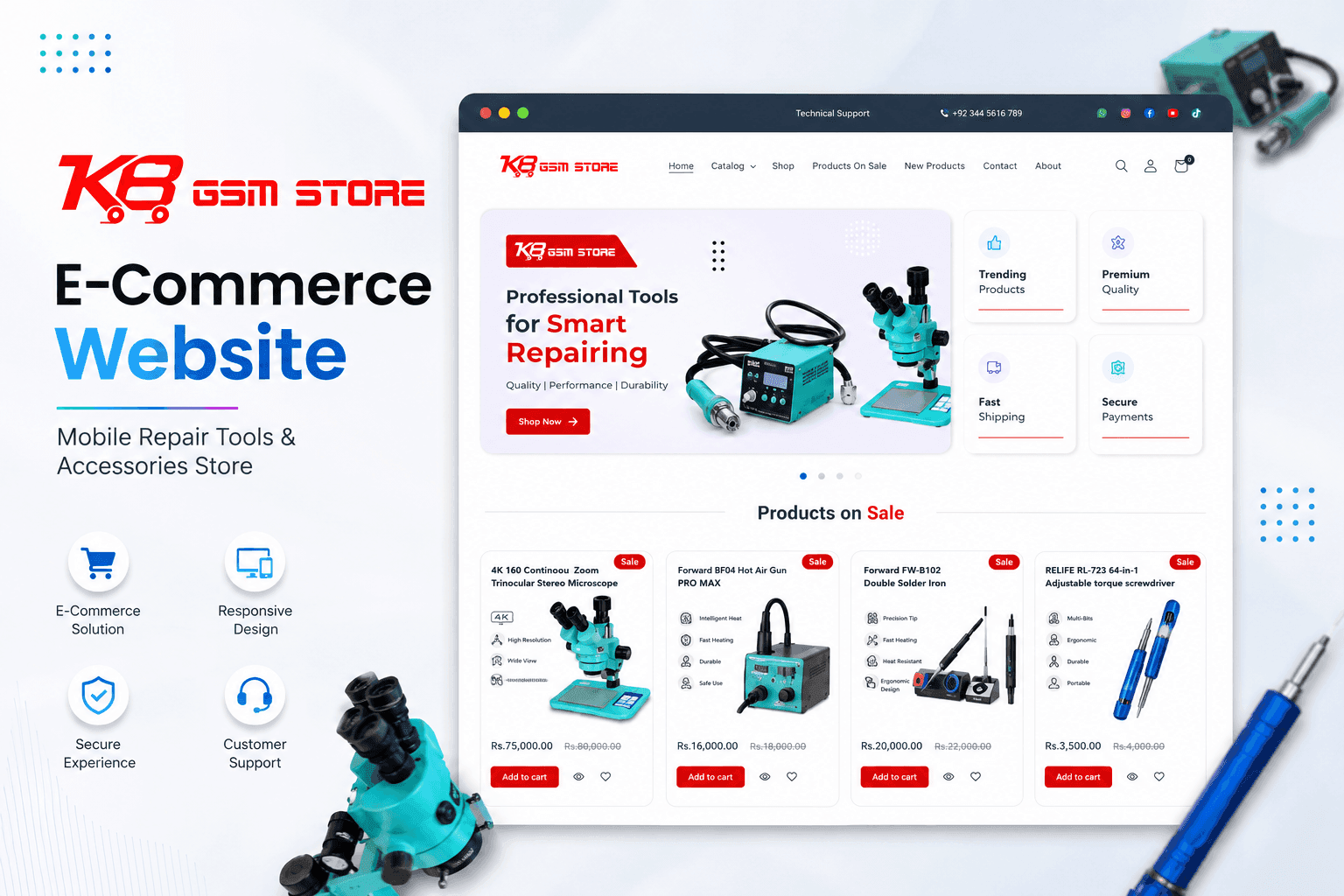
B2B E-Commerce & Inventory Sync | Devsio
Multi-category e-commerce storefront for mobile repair hardware and accessories with real-time SKU search and automated inventory sync.
Guides for Small Business Owners
Practical articles on the problems this service solves, written from real client work.
Why Your Business Doesn’t Show in Google’s Local Pack, and What Actually Moves It
The three map results at the top of a local search take most of the clicks. Here is what the ranking data says decides who appears there, and the order to work through it.
Traffic But No Enquiries? Five Things We Check on UK Small Business Websites
Your analytics show visitors. Your inbox is empty. Here are the five things we check first on UK small business websites, and what the data says about fixing them.
AI Automation for Small Businesses FAQs
Ready to get started with AI Automation for Small Businesses?
Book a free call and get a written, fixed-price quote. Every project includes 30 days of support after launch.
